Thursday, May 1, 2014

Solving RLC circuit using State Space Representation


Problem:
Here is an attempt to solve a simple R-L-C circuit using space vector representation using MATLAB. In this post we will see discuss on
1. Constructing State Space representation
2.  Plot the output voltage across capacitor using MATLAB 'ss' commands
3.  Plot same without using state space function (ss) in MATLAB.

Introduction:
    Most of the undergraduate students would be familiar with constructing either differential equations or Laplace equations of an RLC circuit and analyse the circuit behavior. But apart from this classical methods one could use State space matrices also to solve this kinds of problems, which is widely used in modern control systems.
          State space representation of a given system helps to solve differential equations of any order to simple linear differential equations of first order. The state of the system shall be found out in time domain itself rather than going to frequency domain and solving it. Another advantage of using this method is initial value of energy storing elements such as capacitors (voltage) and inductors(current) shall easily be considered, once state equations are available. This make it differs from Laplace equations where we consider initial conditions of the energy storing elements as zero though its possible to make Laplace equation of system considering the initial conditions.

Figure1: RLC circuit


 Consider figure 1 which shows an RLC circuit. Here R, L and C are in series. Practically one could consider it as a part of Buck Converter or shall be considered as Low side MOSFET driving an inductive load with coil resistance R and ESD capacitor or Coss of MOSFET as C in circuit. RL is representing the load resistance. Consideration of load resistance will help to consider the loading effect experienced by the circuit, helps to get output close to practical scenario.

Making of State space representation
        This has two parts. One is state equation and another is output equation.

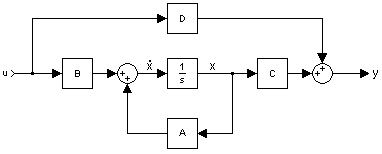
ẋ = Ax + Bu       --------------> State equation
y = Cx + Du       --------------> Output equation

ẋ = First derivative of state vector matrix 'x'
u = Input to the system. (It is represented as Vg also )
y = Output matrix
A = Evaluation matrix
B = Control Matrix
C = Observing Matrix
D = Transition Matrix

This shall be represented in below form also. This is what considered in method-2 matlab program. This will be discussed later.

Fig2:
From Wikipedia 

or


Now we shall consider constructing these matrices. Vc and IL are considered as state vectors.  Consider KVL & KCL and form following equations

Vo = Vc
Note: Edited on 2nd may for typo errors.


So above differential equations shall be represented in below matrix form
for state equation (ẋ = Ax + Bu  ):

and for output equation (y = Cx + Du)


dot(iL) = d(iL)/dt
dot(Vc) = d(Vc)/dt


---------------------------------------------------------------------------------------
So its time to plot the output curve
Method 1:
  This is the standard method which one shall follow in MATLAB.

 %  RLC circuit
 % 30/04/2014
 % author:  vipin p nair

 R = 0.1;
 C = 330e-6;
 L = 22e-6;

 RL=10e+3;


 % State variables
 A_SS = [-R/L -1/L ; 1/C -1/(C*RL)];
 B_SS = [1/L; 0];
 C_SS = [0 1];
 D_SS = [0];

% state vectors
% edited 2nd may
 % initial conditions  iL & Vc are zero initially
% command 'initial' shall be used to plot with initial condition'

 G = ss(A_SS, B_SS, C_SS, D_SS);
 impulse(G);
 figure;
 step(G);

% edited: 2nd May
% plot with initial condition
initial(G, [iL ; Vc]);
[y, t, x]=initial(G, [iL ; Vc]); % to take values with out plotting

Output:


Method 2 : By considering fig2 and plotting same output without using ss function.
considers integration using summation inside the 'for' loop

 %  RLC circuit
 % 30/04/2014
 % author:  vipin p nair
 clear all;

 R = 0.1;
 C = 330e-6;
 L = 22e-6;

 RL=10e+3;


 % State variables
 A_SS = [-R/L -1/L ; 1/C -1/(C*RL)];
 B_SS = [1/L; 0];
 C_SS = [0 1];
 D_SS = [0];

% state vectors
 % initial conditions
 iL = 0;
 Vc = 0;
 xout = [iL; Vc];
 % initial condition
 u = 1; % 1volt step input

 Bu = B_SS.*u;
 xbar_array = [0; 0];
 xout_array = [0; 0];
for i=1:3000
       Ax = A_SS*xout;
       xbar = Bu + Ax;
       xbar_array =  [xbar_array, xbar];
       % considers 1us as delta T for integration
       xout =  transpose(sum(transpose(xbar_array))).*0.000001;
       xout_array = [xout_array, xout];
end
y = transpose(xout_array);
plot(y(1:3000,2));
xlabel 'time in microseconds';
ylabel 'Amplitude';
title 'Step response'

Output:


Hope this article is clear. Try it out!!! Comment your doubts.

Wednesday, May 19, 2010

Intensive Care Unit - informer System

ICU informer System


It’s a common scenario that the relatives of the patients in the ICU unit were very eager to get the updated results of the patient’s condition. But it’s not possible to enter in to this unit and ask about the condition. In this situation the ICU informer system works. This device has three sections,


1) The device called remote unit which will be placed outside the ICU
This unit contains a transceiver, a microcontroller unit, a 4 line LCD display (20 *4) and a keypad
2) The device which is present at the doctor’s side,
This unit has a transceiver, a TTL to RS232 convertor and a computer.
3) A management software present at the doctors computer.
This software is used to send the messages and also to display the received messages. Here I have given only simple software for interfacing purpose. The users can make the software according to their need.


Working
The nurses can enter the basic readings of patients such as patient ID, body temperature, blood pressure and heart rate. By pressing the SEND button these data’s will be transmitted. So the details of the new patient will be available in the doctor’s computer. This patient may be in the casualty unit. So the doctor can reply back the proper action to be taken. Note in picture a 2 line LCD is shown. Connect a 20*4 lcd display for its proper working. The baud rate is 2400bps for both directions.
The remote unit sends the data in the following format
Cpid*temp*bp*hertrate#
i.e. first it send the character ‘C’ followed by Patients ID, temperature and soon and ended by # symbol
Another thing is the software in the doctor’s side can frequently send the current status of the patients to this remote unit. The display will then displays the PID and on the next three lines the message.
The computer sends the data in the following format
RPIDno*message#
The size of PID is fixed and it is a 4 digit number.


Circuit Diagrams


The software at computer side


DOWNLOAD the project


Program
// hospital management system
// vipin.p.nair
// College of engneering kallooppara
// 19/2/10
// www.vipinprojects.blogspot.com


unsigned short i, mydata;
char msg[75];
char smsg[20];
char keyboardread()
{
if(!PORTD.F0) return '1';
if(!PORTD.F1) return '2';
if(!PORTD.F2) return '3';
if(!PORTD.F3) return '4';
if(!PORTD.F4) return '5';
if(!PORTD.F5) return '6';
if(!PORTD.F6) return '7';
if(!PORTD.F7) return '8';
if(!PORTC.F0) return '9';
if(!PORTC.F1) return '0';
if(!PORTC.F2) return '.'; // '.'
if(!PORTC.F3) return 11; // CLEAR
if(!PORTC.F4) return 12; // enter
return 13;
}

void displaymsg()
{
int i,j,flag = 1;
Lcd_Cmd(Lcd_CLEAR);
Lcd_Out(1,1,"PID:");
for (i=0; msg[i]!='*';i++)
{
Lcd_Chr(1, 5+i, msg[i]);
}
i++;
for(j=0; j<20 ;j++,i++)
{
if(msg[i] == '#')
{flag = 0;
break;}
Lcd_Chr(2, 1+j, msg[i]);
}
if(flag)
{
for(j=0; j<20 ;j++,i++)
{
if(msg[i] == '#')
{flag = 0;
break;}
Lcd_Chr(3, 1+j, msg[i]);
}
}
if(flag)
{
for(j=0; j<20 ;j++,i++)
{
if(msg[i] == '#')
{flag = 0;
break;}
Lcd_Chr(4,1+j,msg[i]);
}
}
}
void readdata()
{
char key;
Lcd_Cmd(Lcd_CLEAR);
Lcd_Out(1,1,"PID:");
smsg[0] = 'C';
Delay_ms(500);
while((key = keyboardread())== 13);
Lcd_Chr(1,5,key); Delay_ms(500);
smsg[1] = key;
while((key = keyboardread())== 13);
Lcd_Chr(1,6,key); Delay_ms(500);
smsg[2] = key;
while((key = keyboardread())== 13);
Lcd_Chr(1,7,key); Delay_ms(500);
smsg[3] = key;
while((key = keyboardread())== 13);
Lcd_Chr(1,8,key);
smsg[4] = key;
smsg[5] = '*';
Lcd_Out(2,1,"Temp:"); Delay_ms(500);
while((key = keyboardread())== 13);
Lcd_Chr(2,6,key); Delay_ms(500);
smsg[6] = key;
while((key = keyboardread())== 13);
Lcd_Chr(2,7,key); Delay_ms(500);
smsg[7] = key;
while((key = keyboardread())== 13);
Lcd_Chr(2,8,key); Delay_ms(500);
smsg[8] = key;
smsg[9] = '*';
Lcd_Out(3,1,"BP:"); Delay_ms(500);
while((key = keyboardread())== 13);
Lcd_Chr(3,4,key); Delay_ms(500);
smsg[10] = key;
while((key = keyboardread())== 13);
Lcd_Chr(3,5,key); Delay_ms(500);
smsg[11] = key;
while((key = keyboardread())== 13);
Lcd_Chr(3,6,key);
smsg[12] = key;
smsg[13] = '*';
Lcd_Out(4,1,"Heart Rate:"); Delay_ms(500);
while((key = keyboardread())== 13);
Lcd_Chr(4,12,key); Delay_ms(500);
smsg[14] = key;
while((key = keyboardread())== 13);
Lcd_Chr(4,13,key); Delay_ms(500);
smsg[15] = key;
while((key = keyboardread())== 13);
Lcd_Chr(4,14,key); Delay_ms(500);
smsg[16] = key;
smsg[17] = '#';
smsg[18] = 0;
while(keyboardread() != 12);
Lcd_Cmd(Lcd_CLEAR);
Lcd_Out(1,3,"Sending...");

for(i=0;i<19;i++)
{
Usart_Write(smsg[i]);
Delay_ms(100);
}
Lcd_Cmd(Lcd_CLEAR);
Lcd_Out(1,3,"Send.");
}
void main() {
char key;
char *temp;
PORTA = 0x00;
PORTB = 0x00;
PORTC = 0xFF;
PORTD = 0xFF;
TRISA = 0;
TRISB = 0;
TRISC = 0x1F;
TRISD = 0xFF;
Lcd_Init(&PORTB); // Initialize LCD connected to PORTB
Lcd_Cmd(Lcd_CLEAR); // Clear display
Lcd_Cmd(Lcd_CURSOR_OFF);
Lcd_Out(2,7,"Welcome");
Delay_ms(1000);
// Initialize USART module (8 bit, 2400 baud rate, no parity bit..)
Usart_Init(2400);
while(1)
{
if (!Usart_Data_Ready())
if(keyboardread() == 11)
{readdata();
continue;}
mydata = Usart_Read();
if (mydata == 'R')
{ i=0;
do
{
while(!Usart_Data_Ready());
msg[i] = Usart_Read();
Usart_Write(msg[i]);
i++;
}
while((msg[i-1]!= '#') && (i <75));
displaymsg();
}
else
continue;
}
}

_____________________________________________________

Wednesday, October 7, 2009

Filtering an Input signal using Digital Filter

Hi,
This a program in MATLAB. This program s
hows you, how the digital filter filters a desired frequency from an input signal.
I had written two methods for doing this.One methods is using Convolution (filtering takes place in time domain)and the other is using the property of convolu
tion (filtering action takes place in frequency domain). In this program the input signal is selected such that it contains two frequencies and both are present all the time. Since this is a Linear time invariant signal we can do the filtering in frequency domain too.
The basic algorithm of this program is as follows:
1) sample the input signal
2) plot the signal, its sampled version, and its frequency components
3) finding the FFT
4) Plot it .
5) designing a low pass filter
6) displaying filter response


7) In Frequency domain method
a) multiply both responses
b) displaying the resultant response
c) finding inverse fft
d) displaying it;
In Time domain method
a) finding the impulse response of filter

b) convoluting it with input signal
c) displaying it.
8) END


DOWNLOAD
Program using Convolution

%% filtering of an input signal using convolution
% vipin.p.nair
% 28-sept-2009

%% observations
% 1) when we increse the signal duration the power
% content will also increase.

% 2) anplitude of power also increases with increase
% of N

% 3) we need to display only the the frequency up to FS/2

% bcz the values beyond it will be a mirror image of the
% first. ie we are displaying 0 to pi.
%% program


clear all
f1 = 2000;
f2 = 1000;

t=.002; % input signal duration in seconds.
Ts = 1/50000;
n = 0: Ts :10*t;
x = 5*sin(2*pi*f2*n) + 5*cos(2*pi*f1*n);
figure(1);
subplot(2,2,1), plot(n*1000, x);
title 'Input signal';
xlabel 'time (ms)'
ylabel 'voltage'
grid;
subplot(2,2,2), plot(n*1000, x, '.');
title 'Input signal samples';
xlabel 'time (ms)'
ylabel 'voltage';
grid;
subplot(2,2,3), plot(n*1000,5*cos(2*pi*f1*n));
title 'Input signal frequency -1';
xlabel 'time (ms)'
ylabel 'voltage'
grid;
subplot(2,2,4), plot(n*1000,5*sin(2*pi*f2*n));
title 'Input signal frequency -2';
xlabel 'time (ms)'
ylabel 'voltage'
grid;
% frequency spectrum of input signal
N =1024*1;
Xk = fft(x,N);
Pxx = Xk .* conj(Xk)/N;
figure(2);
plot((0:N/2)/(N*Ts),(Pxx(1:N/2+1)));
title 'Power spectrum'
xlabel 'Frequency (Hz) upto Fs/2'
grid;

% filter
filter_order = 10;
Fs = 1/Ts;
fc = 1500 / ( Fs/2) ;
[b,a] = butter(filter_order, fc);
w = 0: 2*pi/(N-1) :pi;
[H,wn2] = freqz(b,a,w);

figure(3)
plot(w/pi*Fs/2,(abs(H)));

h = ifft(H,length(n));
out = cconv(abs(h),x);
ln=length(n);
figure(4);
plot(n*1000,out(1:ln));grid;
title 'Signal after filtering'

OUTPUT FIGURES


Program using filtering in frequency domain

%% filter
% vipin.p.nair

% sept- 28- 2009
% observations

% 1) when we increse the signal duration the power

% content will also increase.

% 2) anplitude of power also increases with increase
% of N
% 3) we need to display only the the frequency up to FS/2

% bcz the values beyond it will be a mirror image of the
% first. ie we are displaying 0 to pi.


clear all
f1 = 2000;
f2 = 500;

t=0.06; % input signal duration in seconds.
Ts = 1/10000;
n = 0: Ts :t;
x = 5*sin(2*pi*f2*n) + 5*cos(2*pi*f1*n);
figure(1);
subplot(2,2,1), plot(n*1000, x);
title 'Input signal';
xlabel 'time (ms)'
ylabel 'voltage'
grid;
subplot(2,2,2), plot(n*1000, x, '.');
title 'Input signal samples';
xlabel 'time (ms)'
ylabel 'voltage';
grid;
subplot(2,2,3), plot(n*1000,5*cos(2*pi*f1*n));
title 'Input signal frequency -1';
xlabel 'time (ms)'
ylabel 'voltage'
grid;
subplot(2,2,4), plot(n*1000,5*sin(2*pi*f2*n));
title 'Input signal frequency -2';
xlabel 'time (ms)'
ylabel 'voltage'
grid;
% frequency spectrum of input signal
N =1024*1;
Xk = fft(x,N);
Pxx = Xk .* conj(Xk)/N;
figure(2);
plot((0:N/2)/(N*Ts),(Pxx(1:N/2+1)));
title 'Power spectrum'
xlabel 'Frequency (Hz) upto Fs/2'
grid;

% filter
filter_order = 10;
Fs = 1/Ts;
fc = 1500 / ( Fs/2) ;
[b,a] = butter(filter_order, fc);

%'syms z
%v=tf (b,a);
w = 0: 2*pi/(N-1) :pi;
[h,wn] = freqz(b,a,w);
[h2,wn2] = freqz(b,a,0: 2*pi/(N-1): 2*pi);
figure(3)
plot(wn/pi*Fs/2,(abs(h)));
title 'Filter response'
xlabel 'Frequency (Hz) upto Fs/2'
figure(4)
Yk = h.*Xk(1:N/2);
Yk2 = h2.*Xk;
plot(wn/pi*Fs/2,(abs(Yk)));
xlabel 'Frequency (Hz) upto Fs/2'
title ' frequency spectrum after filtering'
grid;
%figure(5)
%plot(wn/pi*Fs/2,(abs(Xk(1:N/2))));
%grid;
figure(6)
plot(abs(ifft(Yk2,N)));

OUTPUT:


Output signal waveform

Wednesday, May 27, 2009

Tic - Tac - Toe in C


This is a famous game. Here it is written in Turbo c. In this game one player is the user and the other is the computer.

The important feature in this is that the user can use the mouse to select the cells. I wrote this program mainly to introduce how to use mouse in your c programs.

1) For using mouse you must declare the header file ‘bios.h’.


2) Another thing is a union should be declared as follows:

union REGS regs;


3) The mouse can be initialized as follows

regs.x.ax=0;

int86(0x33,&regs,&regs);


4) To show the mouse

regs.x.ax=1;

int86(0x33,&regs,&regs);


5) To hide the mouse

regs.x.ax=2;

int86(0x33,&regs,&regs);


6) To read the co ordinate (position)

regs.x.ax=3;

int86(0x33,&regs,&regs);

left = regs.x.bx&1; //to get left click

right = regs.x.bx&2;// right click

x = regs.x.cx; // x –coordinate

y= regs.x.dx; // y –coordinate

Here left, right, x, y is in integer data type.

These are the main instructions use full for writing mouse using programs. If the graphics is initialized in your program then the mouse pointer will have an arrow head. Otherwise it will be a rectangular block.

The following strategy can be used while writing these programs.

Coordinate ()

{

Readmouse();

If(x>50 && x<150>25 &&y<50)

Click(1);

...

}

Click(int z)

{

Readmouse();

While(left)

{

Readmouse();

Switch(z)

{

…

}

}

}

Download and Enjoy the game.

Tic-Tac- Toe :- Program

/* Tic Tac Toe - Game
* Vipin p nair *
* 25-5-09 *
* College of Engineering Kallooppara *
* vipinpn@gmail.com *
* Kerala *
*/


#include "graphics.h"
#include "bios.h"
#include "conio.h"
#include "stdlib.h"
#include "time.h"
#define CELL1 (x_cord>100 && x_cord<150>100 && y_cord<150)
#define CELL2 (x_cord>150 && x_cord<200>100 && y_cord<150)
#define CELL3 (x_cord>200 && x_cord<250>100 && y_cord<150)

#define CELL4 (x_cord>100 && x_cord<150>150 && y_cord<200)
#define CELL5 (x_cord>150 && x_cord<200>150 && y_cord<200)
#define CELL6 (x_cord>200 && x_cord<250>150 && y_cord<200)

#define CELL7 (x_cord>100 && x_cord<150>200 && y_cord<250)
#define CELL8 (x_cord>150 && x_cord<200>200 && y_cord<250)
#define CELL9 (x_cord>200 && x_cord<250>200 && y_cord<250)

#define EXIT (x_cord>230 && x_cord<290>260 && y_cord<290)
#define NEW (x_cord>160 && x_cord<220>260 && y_cord<290)
#define ABOUT (x_cord>60 && x_cord<130>260 && y_cord<290)

void PlyrComp();
union REGS regs;

int left_click,
x_cord,
y_cord,
select[9],
selectcmp[9];

char pass,pass1,pass2,win=1;
// mouse functions
void InitMouse()
{
// initialize
regs.x.ax=0;
int86(0x33,&regs,&regs);
}
void showmouse()
{
// show mouse
regs.x.ax=1;
int86(0x33,&regs,&regs);

}
void hidemouse()
{
regs.x.ax=2;
int86(0x33,&regs,&regs);
}

void readmouse()
{
regs.x.ax = 3;
int86(0x33,&regs,&regs);
left_click = regs.x.bx & 1;
// right_click = regs.x.bx & 2
x_cord = regs.x.cx;
y_cord = regs.x.dx;
}
// graphics functions
void InitGraphics()
{
int gdriver=DETECT,gmode,errorcode;
initgraph(&gdriver,&gmode,"");
/* read result of initialization */
errorcode = graphresult();
if (errorcode != grOk) /* an error occurred */
{
printf("Graphics error: %s\n", grapherrormsg(errorcode));
printf("Press any key to halt:");
getch();
exit(1); /* terminate with an error code */
}
}


void MainScreen()
{
setbkcolor(CYAN);
setcolor(WHITE);
rectangle(100,100,250,250);
setfillstyle(1,BLUE);
floodfill(150,150,WHITE);
line(100,150,250,150);
line(100,200,250,200);
line(150,100,150,250);
line(200,100,200,250);
rectangle(50,50,300,300);
rectangle(230,260,290,290);
rectangle(160,260,220,290);
rectangle(50,300,300,330);
rectangle(60,260,130,290);
setfillstyle(9,LIGHTBLUE);
floodfill(240,270,WHITE);
floodfill(170,270,WHITE);
floodfill(70,270,WHITE);
setfillstyle(9,LIGHTMAGENTA);
floodfill(350,350,WHITE);
settextstyle(1,0,2);
setcolor(RED);
outtextxy(115,60,"Tic-Tac-Toe");
outtextxy(240,260,"Exit");
outtextxy(170,260,"New");
outtextxy(66,260,"About");
setcolor(WHITE);
select[0]=0;select[1]=0;select[2]=0;
select[3]=0;select[4]=0;select[5]=0;
select[6]=0;select[7]=0;select[8]=0;
selectcmp[0]=0;selectcmp[1]=0;selectcmp[2]=0;
selectcmp[3]=0;selectcmp[4]=0;selectcmp[5]=0;
selectcmp[6]=0;selectcmp[7]=0;selectcmp[8]=0;
pass=0;
pass2=0;
PlyrComp();
}
//*************************************************************
void Comptr_click(int a)
{
switch(a)
{
case 0:
case 1: outtextxy(120,115,"O");selectcmp[0]=1;
break;
case 2: outtextxy(170,115,"O");selectcmp[1]=1;
break;
case 3: outtextxy(220,115,"O");selectcmp[2]=1;
break;
case 4: outtextxy(120,165,"O");selectcmp[3]=1;
break;
case 5: outtextxy(170,165,"O");selectcmp[4]=1;
break;
case 6: outtextxy(220,165,"O");selectcmp[5]=1;
break;
case 7: outtextxy(120,215,"O");selectcmp[6]=1;
break;
case 8: outtextxy(170,215,"O");selectcmp[7]=1;
break;
case 9: outtextxy(220,215,"O");selectcmp[8]=1;
break;
}
pass1=1;
}

//**************************************************************
void PlyrComp()
{
int x=0;
// getch();

if(!pass)
{
randomize();
Comptr_click(rand()%10);
pass=1;
return;
}
// final step for computer win
// horiz check
pass1=0;
if ((selectcmp[0]+selectcmp[1]+selectcmp[2])==2)
{
if (((selectcmp[0]+selectcmp[1])==2) && !select[2])
Comptr_click(3);
if (((selectcmp[0]+selectcmp[2])==2) && !select[1])
Comptr_click(2);
if (((selectcmp[1]+selectcmp[2])==2) && !select[0])
Comptr_click(1);
}
if(pass1)return;
pass1=0;
if ((selectcmp[3]+selectcmp[4]+selectcmp[5])==2)
{
if (((selectcmp[3]+selectcmp[4])==2) && !select[5])
Comptr_click(6);
if (((selectcmp[3]+selectcmp[5])==2) && !select[4])
Comptr_click(5);
if (((selectcmp[4]+selectcmp[5])==2) && !select[3])
Comptr_click(4);
}
if(pass1)return;
pass1=0;
if ((selectcmp[6]+selectcmp[7]+selectcmp[8])==2)
{
if (((selectcmp[6]+selectcmp[7])==2) && !select[8])
Comptr_click(9);
if (((selectcmp[6]+selectcmp[8])==2) && !select[7])
Comptr_click(8);
if (((selectcmp[7]+selectcmp[8])==2) && !select[6])
Comptr_click(7);
}
if(pass1)return;

// vertical check
pass1=0;
if ((selectcmp[0]+selectcmp[3]+selectcmp[6])==2)
{
if (((selectcmp[0]+selectcmp[3])==2) && !select[6])
Comptr_click(7);
if (((selectcmp[0]+selectcmp[6])==2) && !select[3])
Comptr_click(4);
if (((selectcmp[3]+selectcmp[6])==2) && !select[0])
Comptr_click(1);
}
if(pass1)return;
pass1=0;
if ((selectcmp[1]+selectcmp[4]+selectcmp[7])==2)
{
if (((selectcmp[1]+selectcmp[4])==2) && !select[7])
Comptr_click(8);
if (((selectcmp[1]+selectcmp[7])==2) && !select[4])
Comptr_click(5);
if (((selectcmp[4]+selectcmp[7])==2) && !select[1])
Comptr_click(2);
}
if(pass1)return;
pass1=0;
if ((selectcmp[2]+selectcmp[5]+selectcmp[8])==2)
{
if (((selectcmp[2]+selectcmp[5])==2) && !select[8])
Comptr_click(9);
if (((selectcmp[2]+selectcmp[8])==2) && !select[5])
Comptr_click(6);
if (((selectcmp[5]+selectcmp[8])==2) && !select[2])
Comptr_click(3);
}
if(pass1)return;
pass1=0;
if ((selectcmp[0]+selectcmp[4]+selectcmp[8])==2)
{
if (((selectcmp[0]+selectcmp[4])==2) && !select[8])
Comptr_click(9);
if (((selectcmp[0]+selectcmp[8])==2) && !select[4])
Comptr_click(5);
if (((selectcmp[8]+selectcmp[4])==2) && !select[0])
Comptr_click(1);
}
if(pass1)return;
pass1=0;
if ((selectcmp[2]+selectcmp[4]+selectcmp[6])==2)
{
if (((selectcmp[2]+selectcmp[4])==2) && !select[6])
Comptr_click(7);
if (((selectcmp[2]+selectcmp[6])==2) && !select[4])
Comptr_click(5);
if (((selectcmp[6]+selectcmp[4])==2) && !select[2])
Comptr_click(3);
}
if(pass1)return;

// blocking plyr winning conditions
// horiz check
pass1=0;
if ((select[0]+select[1]+select[2])==2)
{
if (((select[0]+select[1])==2) && !selectcmp[2])
Comptr_click(2+1);
if (((select[0]+select[2])==2) && !selectcmp[1])
Comptr_click(1+1);
if (((select[1]+select[2])==2) && !selectcmp[0])
Comptr_click(0+1);
}
if(pass1)return;
pass1=0;
if ((select[3]+select[4]+select[5])==2)
{
if (((select[3]+select[4])==2) && !selectcmp[5])
Comptr_click(5+1);
if (((select[3]+select[5])==2) && !selectcmp[4])
Comptr_click(4+1);
if (((select[4]+select[5])==2) && !selectcmp[3])
Comptr_click(3+1);
}
if(pass1)return;
pass1=0;
if ((select[6]+select[7]+select[8])==2)
{
if (((select[6]+select[7])==2) && !selectcmp[8])
Comptr_click(8+1);
if (((select[6]+select[8])==2) && !selectcmp[7])
Comptr_click(7+1);
if (((select[7]+select[8])==2) && !selectcmp[6])
Comptr_click(6+1);
}
if(pass1)return;

// vertical check
pass1=0;
if ((select[0]+select[3]+select[6])==2)
{
if (((select[0]+select[3])==2) && !selectcmp[6])
Comptr_click(6+1);
if (((select[0]+select[6])==2) && !selectcmp[3])
Comptr_click(3+1);
if (((select[3]+select[6])==2) && !selectcmp[0])
Comptr_click(0+1);
}
if(pass1)return;
pass1=0;
if ((select[1]+select[4]+select[7])==2)
{
if (((select[1]+select[4])==2) && !selectcmp[7])
Comptr_click(7+1);
if (((select[1]+select[7])==2) && !selectcmp[4])
Comptr_click(4+1);
if (((select[4]+select[7])==2) && !selectcmp[1])
Comptr_click(1+1);
}
if(pass1)return;
pass1=0;
if ((select[2]+select[5]+select[8])==2)
{
if (((select[2]+select[5])==2) && !selectcmp[8])
Comptr_click(8+1);
if (((select[2]+select[8])==2) && !selectcmp[5])
Comptr_click(5+1);
if (((select[5]+select[8])==2) && !selectcmp[2])
Comptr_click(2+1);
}
if(pass1)return;
pass1=0;
if ((select[0]+select[4]+select[8])==2)
{
if (((select[0]+select[4])==2) && !selectcmp[8])
Comptr_click(8+1);
if (((select[0]+select[8])==2) && !selectcmp[4])
Comptr_click(4+1);
if (((select[8]+select[4])==2) && !selectcmp[0])
Comptr_click(0+1);
}
if(pass1)return;
pass1=0;
if ((select[2]+select[4]+select[6])==2)
{
if (((select[2]+select[4])==2) && !selectcmp[6])
Comptr_click(6+1);
if (((select[2]+select[6])==2) && !selectcmp[4])
Comptr_click(4+1);
if (((select[6]+select[4])==2) && !selectcmp[2])
Comptr_click(2+1);
}
if(pass1)return;
pass1=0;
while(pass2 && (checkwin()==3) && !pass1)
{
x=rand()%10;
if( (!select[x-1]) && (!selectcmp[x-1]) )
{
Comptr_click(x);
return;
}
}

}


//****************************************************************

int checkwin()
{
int i;
// return 1 for player win , 2 for computer & 0 for draw
// horiz
if (select[0] && select[1] && select[2]) return 1;
if (select[3] && select[4] && select[5]) return 1;
if (select[6] && select[7] && select[8]) return 1;
// vert
if (select[0] && select[3] && select[6]) return 1;
if (select[1] && select[4] && select[7]) return 1;
if (select[2] && select[5] && select[8]) return 1;
// diag
if (select[0] && select[4] && select[8]) return 1;
if (select[6] && select[4] && select[2]) return 1;
// comp
// horiz
if (selectcmp[0] && selectcmp[1] && selectcmp[2]) return 2;
if (selectcmp[3] && selectcmp[4] && selectcmp[5]) return 2;
if (selectcmp[6] && selectcmp[7] && selectcmp[8]) return 2;
// vert
if (selectcmp[0] && selectcmp[3] && selectcmp[6]) return 2;
if (selectcmp[1] && selectcmp[4] && selectcmp[7]) return 2;
if (selectcmp[2] && selectcmp[5] && selectcmp[8]) return 2;
// diag
if (selectcmp[0] && selectcmp[4] && selectcmp[8]) return 2;
if (selectcmp[6] && selectcmp[4] && selectcmp[2]) return 2;
for (i=0;i<9;i++)
if(!(select[i]||selectcmp[i]))
return 3;
return 0;
}

//****************************************************************8
int check(int a)
{
if (a==9 || a==10) return 0;
if (select[a] || selectcmp[a])
return 1;
return 0;
}
//****************************************************************
result()
{
switch(checkwin())
{
case 1: outtextxy(100,300,"Player Wins");return 0;
case 2: outtextxy(100,300,"Computer Wins"); return 0;
case 0: outtextxy(100,300,"Game Draw"); return 0;
}
}
//******************************************************************
void click(int z)
{
readmouse();
while(left_click)
{
left_click=0;
// readmouse();
if(check(z-1))return;
if (z<10)
pass2=z;
else pass2=0;
hidemouse();
switch(z)
{
case 1: outtextxy(120,115,"X");select[0]=1;
break;
case 2: outtextxy(170,115,"X");select[1]=1;
break;
case 3: outtextxy(220,115,"X");select[2]=1;
break;
case 4: outtextxy(120,165,"X");select[3]=1;
break;
case 5: outtextxy(170,165,"X");select[4]=1;
break;
case 6: outtextxy(220,165,"X");select[5]=1;
break;
case 7: outtextxy(120,215,"X");select[6]=1;
break;
case 8: outtextxy(170,215,"X");select[7]=1;
break;
case 9: outtextxy(220,215,"X");select[8]=1;
break;
case 10: cleardevice();
exit(0);
case 11: cleardevice();
MainScreen();
pass=0;
break;
case 12: outtextxy(70,330,"Vipin P Nair");
outtextxy(70,360,"College Of Engineering Kallooppara") ;
outtextxy(70,390,"Kerala, India");
break;
}
// delay(450);
showmouse();
result();
PlyrComp();
win=result();
}
}

//****************************************************************
void cordinate()
{
readmouse();
if (win)
{
if(CELL1)click(1);
if(CELL2)click(2);
if(CELL3)click(3);

if(CELL4)click(4);
if(CELL5)click(5);
if(CELL6)click(6);

if(CELL7)click(7);
if(CELL8)click(8);
if(CELL9)click(9);
}
if(EXIT) click(10);
if(NEW) click(11);
if(ABOUT)click(12);
}


//**************************************************************
void main()
{
InitGraphics();
MainScreen();
InitMouse();
showmouse();
while(1)
cordinate();
}